Why I Think a Budget App Should Work Offline First
· 6 min read · Budgeting, Self-hosting, Actua, Android, Personal Finance
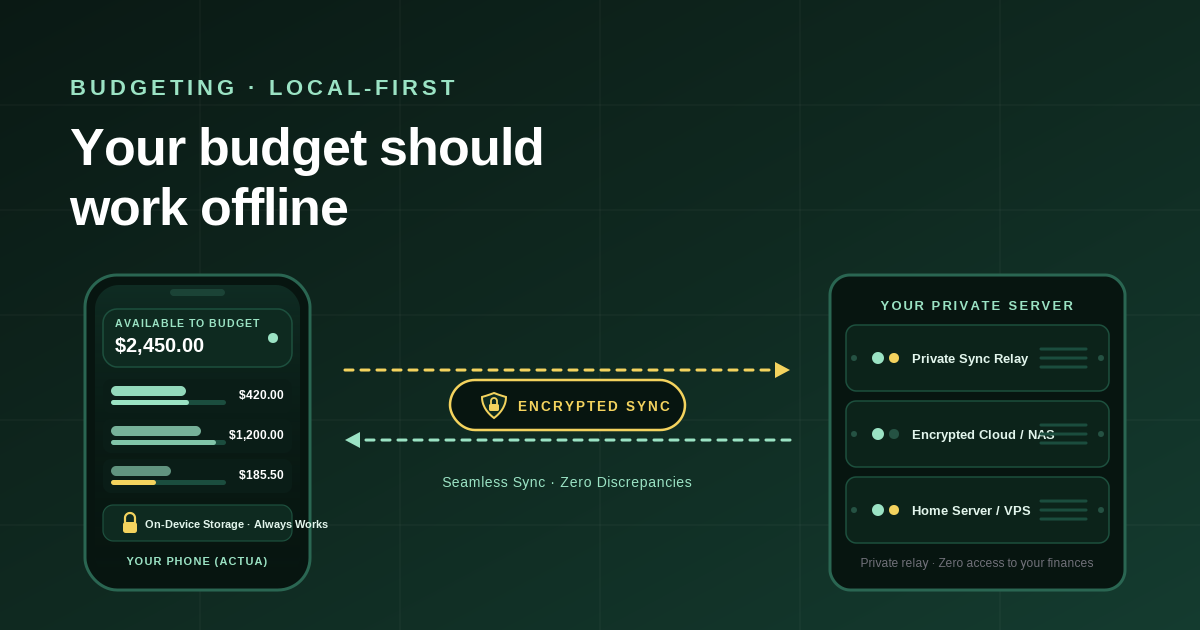
When Mint announced its shutdown in late 2023, millions of people were reminded of an uncomfortable truth about modern personal finance apps: you don’t actually own your budget. Years of categorized spending, personalized tags, and historical trends were suddenly reduced to a deadline, a sunset banner, and a frantic scramble to export messy CSV files.
The default reaction across the industry was predictable. Users were nudged toward another wave of cloud-based subscription services—many charging $100 or more each year to hold your financial data on their servers and analyze your accounts. The alternative for privacy-conscious users has always been spreadsheets. But while spreadsheets give you ownership, trying to tap tiny cells and formulas on a phone while walking out of a store is an exercise in frustration.
I wanted a third path.
When I built Actua, a native Android client for Actual Budget, I started from a simple principle: your budget is your personal financial ledger, and it should live on hardware you own. The phone in your pocket should be its primary home, and the internet should be completely optional.
Here is what that “local-first” model looks like in practice, and why I believe it is the only sensible way to build software for personal finance.
What “local-first” means for your wallet
In traditional cloud apps, the “real” copy of your budget lives on an external server. When you open the app, your phone acts like a browser asking a remote computer for permission to view your balances. If the server is unresponsive, or you happen to be in a subway station, a basement store, or traveling abroad without mobile data, the app freezes behind a loading spinner.
Local-first flips that hierarchy upside down. The entire working copy of your budget lives right on your phone’s storage. Opening the app reads from your device immediately. Logging an expense writes to your device immediately. Syncing is something that happens quietly in the background whenever a connection exists—never a gatekeeper before you can see or manage your money.
For day-to-day budgeting, that shift creates three profound differences:
- Logging an expense takes two seconds. You enter the amount and category at the register while picking up your receipt, not after waiting for a remote server to respond. Because there is zero lag, logging transactions becomes a seamless reflex rather than an annoying chore.
- Airplane mode is not an error state. You can review your categories, plan next month’s spending, or reconcile bank statements on a long flight, on a commute, or in any cellular dead zone.
- Your financial history cannot be shut down. Nobody can cancel your account, lock you out of your records, or hold years of budgeting history behind a price hike. If a company disappears tomorrow, your budget on your phone keeps working without missing a beat.
Traditional Cloud Apps
- A loading spinner every time you open the app or log an expense
- Fails or locks you out when you are in a basement shop, on a flight, or out of data
- Your financial history is tied to a company server that can shut down or raise fees
- Your private spending and income data sits on someone else’s computer
Local-First (Actua)
- Instant speed: opens immediately and logs a transaction in two seconds flat
- Works 100% offline: review categories and enter expenses anywhere, anytime
- Permanent ownership: your financial records stay safe on your own device forever
- True privacy: your budget is encrypted with your own password; no ads, no trackers
Syncing without handing over your data
A natural question with offline apps is: What happens when you use more than one device?
If you log an expense on your phone while your partner categorizes a bill on a laptop at home, will one person’s edits overwrite the other?
This is where thoughtful design makes budgeting effortless. Instead of swapping entire budget files back and forth, the app keeps a lightweight log of individual changes. When your devices reconnect, they simply compare notes and merge the changes cleanly. If you edited a category name while offline and a new transaction was recorded at home, both changes blend smoothly together. Neither edit destroys the other.
To relay those updates between your phone and your computer, Actua connects to an Actual server you host yourself. But unlike commercial cloud services, this server is strictly a private relay:
- It cannot read your financial life. Your phone scrambles your data with end-to-end encryption before sending it out, using a key derived from your budget password. To the server, your budget looks like random noise.
- You don’t need dedicated enterprise gear. A low-power home mini PC, a NAS you already use for photos, or an inexpensive virtual server is more than enough.
You get the convenience of multi-device sync, without broadcasting your personal income, debts, and shopping habits to a corporate database.
(If you are an engineer interested in the low-level sync mechanics—hybrid logical clocks, Merkle tries, and cryptographic wire formats—I wrote a technical deep dive in Offline-First Sync in Actua: What It Takes to Speak Actual Budget’s Protocol on Android).
Three rules I will not bend
Writing a personal finance app teaches you very quickly that architectural shortcuts lead to broken trust. These are three principles I treat as absolute invariants:
1. Money is tracked in exact cents, never floating decimals. Have you ever used a tool where your account balance was inexplicably off by a penny or a few paisa, and nobody could figure out why? That happens when software uses floating-point decimal numbers for financial math. Tiny rounding discrepancies quietly compound over time. In Actua, every transaction, balance, and calculation is tracked in whole cents as exact integers. Integers never drift, and reconciliations always add up to the penny.
2. Every edit follows the exact same path. Whether you are entering a new receipt, splitting a purchase across multiple categories, or adjusting an account balance, the change must be recorded into the sync log reliably. There are no “silent edits” that bypass the log and leave your phone and computer out of sync.
3. Your private numbers stay private. Your budget contains your most intimate data: what you earn, where you shop, medical bills, and personal priorities. Actua never includes real transaction amounts, account names, or payees in crash reports or debug logs. Everything stays encrypted on your device and locked behind Android’s secure hardware keystore.
I wrote more about keeping these guardrails enforced while collaborating with AI coding tools in AI Writes the Code. I Still Make the Calls..
The two-way consistency guarantee
If you use Actua on your phone and Actual Budget on your computer, you need complete confidence that both apps interpret your budget identically. If you create a split transaction or transfer funds between accounts on your phone, you want the exact same balances and links to appear when you sit down at your desk.
Two-Way Balance Guarantee
Quick Edits at the Till
Add an expense at checkout, adjust a category balance, or split a dinner bill—works instantly even with zero reception.
Deep Monthly Planning
Reconcile accounts, review spending reports, and allocate next month's income on a larger desktop screen.
Exact Matches Down to the Cent
Before each release, automated checks run identical everyday budgeting scenarios through both apps to verify that every balance, transfer, and category matches without rounding errors or lost changes.
To guarantee that consistency, Actua runs an automated test suite before every release. It executes identical, real-world budgeting scenarios—splitting grocery receipts with multiple payees, transferring between checking and savings, moving categorized expenses, and deleting transactions—in both Actua and Actual’s reference engine. It then verifies that the resulting balances and records match cell for cell.
If there is even a one-cent disagreement or an altered category, the release is blocked. You shouldn’t have to wonder whether an open-source Android client will corrupt your desktop budget; automated tests make sure it stays 100% faithful to the original.
Who this is for
If you want a personal finance tool that is calm, respects your privacy, opens in a split second, and puts you in complete control of your money, local-first is worth experiencing.
It does require setting up a small personal server if you want multi-device sync, which won’t appeal to everyone. If you prefer a cloud-hosted app that automatically connects to your bank logins in exchange for your data, those tools exist and serve a purpose. But if you value financial independence, zero-latency speed, and the confidence that your budget works anywhere you go, local-first is a breath of fresh air.
Try it
Actua is free, open source, and available on Google Play and F-Droid. You can inspect the source code, check the issue tracker, and find documentation on GitHub:
- Project details: Actua project page
- Source code: github.com/azimul-kabir/actua
If you try it and notice anything that feels slow, confusing, or wrong, please open an issue. Real use by real budgeters is the best feedback there is.